
By C.K. Sample III — July 2026
I’ve written a few of these updates now — why I started building this thing in the first place, an honest run at what it actually looks like to build software with Claude over a real session, and a screenshot-by-screenshot walk through the first 29 sessions, bugs included. So I’m not going to pretend this is some big reveal. It’s just where things stand right now, what changed most recently, and what I keep thinking about as this thing grows past being a tool I only use myself.
The most recent stretch of sessions fixed two things that had quietly been broken and built one thing I’d been wanting for a while, and all three came out of the same backlog list I’d been sitting on for weeks without touching. The Collections tool has a Sequences tab where I lay out the actual page order for a book or zine — separate named sequences, each one an ordered run of photos pulled from a shoot. I’d built drag handles on those sequence blocks a while back and never actually wired them up, so they sat there looking functional and doing nothing every time I opened the tab. Worse, reordering the individual photos inside a sequence, which used to work, had broken somewhere in an earlier rewrite and I hadn’t noticed until I went looking for it. Both are fixed now. I can drag a whole sequence into a new position relative to the others, and I can drag the photos inside any one sequence to renumber them in place, and neither of those things silently regresses again without me knowing, because I went back and actually traced why the old version broke instead of just re-wiring the new one and hoping.


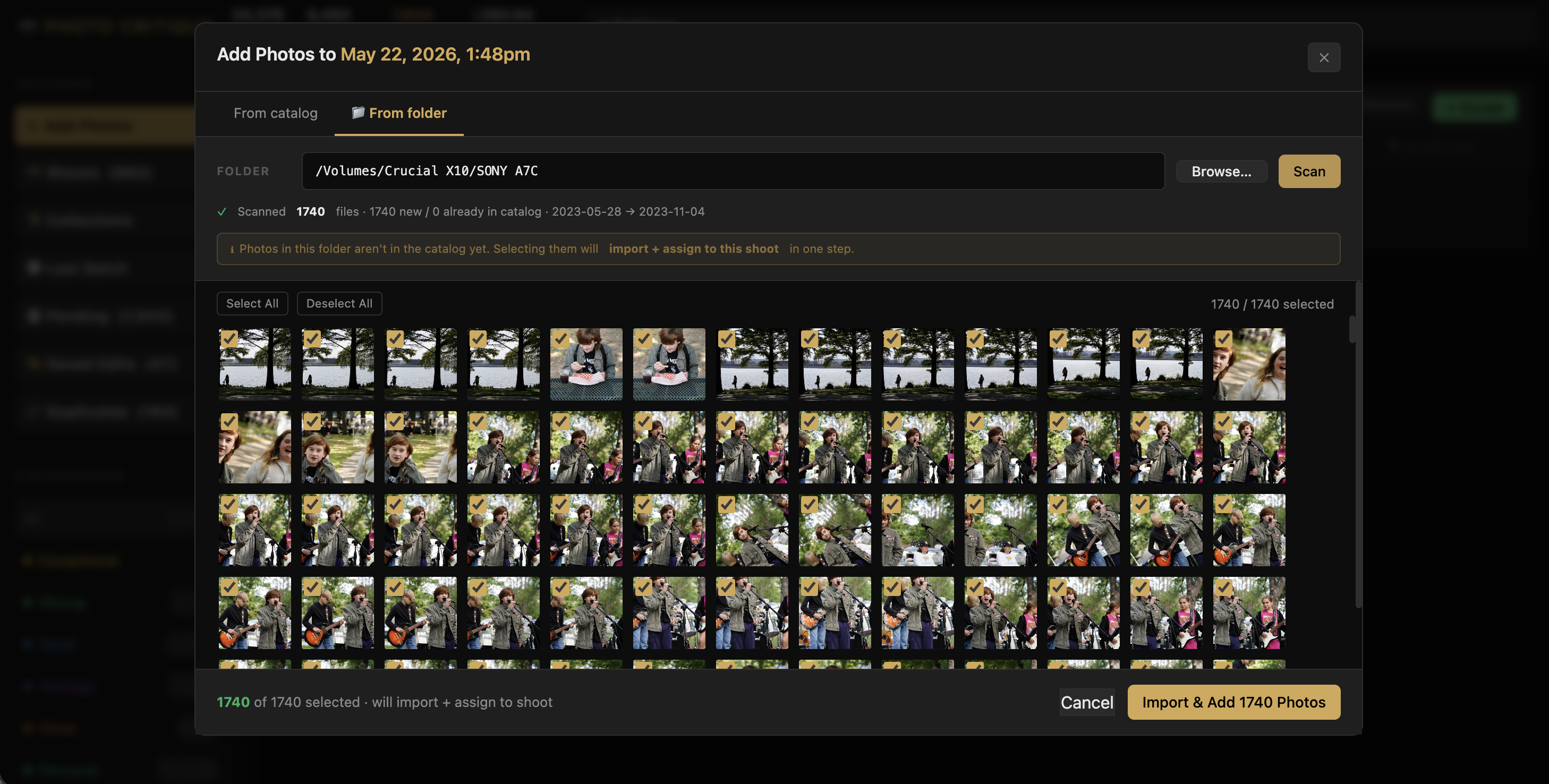
The other piece was the Add Photos to Shoot flow, which I’ve been annoyed by for longer than I’ve admitted. Shoots in the app auto-discover themselves from timestamp and GPS clustering, which works well, but every so often I need to add a few extra frames to a shoot manually — a card that didn’t get scanned the first time, or a photo I only found later. Up until now, doing that meant typing a full file path into a plain text field and then looking at a bare list of filenames with no way to actually see what I was about to bring in, which is exactly the kind of thing that made me not bother half the time. It works the way the rest of the app already worked now: I click Browse, get the same native macOS folder picker the main scan modal uses, and the results come back as an actual grid of thumbnails, with a checkbox on everything new, a little badge marking anything already sitting in the catalog, select-all and deselect-all, and a click-to-zoom preview if I want a closer look before committing. Whatever I’ve got checked gets imported and assigned to the shoot in one step. And while I was in there, I noticed something that had been true for a while without me catching it: the Add Photos button itself only ever showed up on shoots marked “active,” which turned out to be two shoots out of the 962 currently sitting in my catalog. It shows up on all of them now, regardless of status, which is obviously how it should have worked from the start.


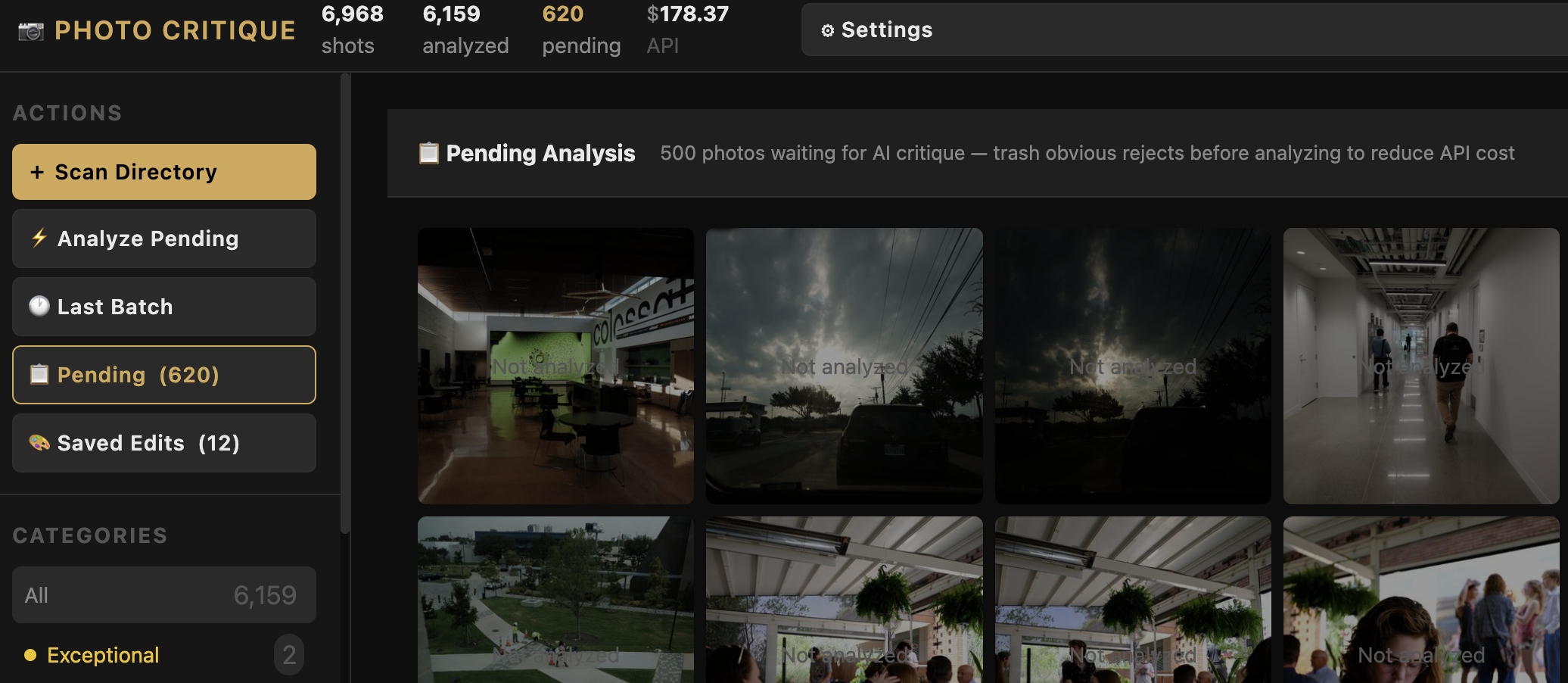
As of today the catalog sitting on my drives runs to 24,376 shots, 6,492 of which have actually gone through the AI critique pipeline, grouped automatically into 962 shoots, and I’ve spent $293.64 on the Anthropic API getting to this point, which still strikes me as a small price for having a system that will tell me honestly, photo by photo, what’s working and what isn’t. Every one of those analyzed photos gets a score from 0 to 100 and lands in one of six categories running from Exceptional down through Trash, plus two categories I control entirely by hand — Personal and Edit Later — that sit outside the scoring altogether, because not every photo I want to keep around is actually about craft. I can send photos through Sonnet for the full critique or through Haiku for something faster and a lot cheaper as a first pass, or run both in sequence and only pay for Sonnet on the photos that survive Haiku’s cut, and none of it runs as some blanket sweep across the whole archive — I select what I want looked at, see what it’ll cost first, and then decide. Every photo that does get analyzed comes back with real critique text, not just a number, and I can agree with it, disagree with it, override the score or the category myself, leave a note, and send it back through for another look with my own context folded into the prompt.
Underneath all of that there’s a fair amount of housekeeping I don’t think about much anymore because it just works: RAW and JPEG pairs from the same capture show up as one photo instead of two, even across the trickier monochrome-only bodies like the Leica Q2 Mono and the RICOH GR IV Mono where that used to be a real problem; duplicates that show up across different folders get caught by matching EXIF data and a perceptual hash and reviewed together instead of one at a time; anything that’s actually a screenshot rather than a real photo gets pulled out of the catalog automatically so it never pollutes the queue; and when I trash a photo, it goes to the trash folder on whatever drive it actually lives on, not some generic system trash that would leave it stranded. Every filter in the app lives in the URL, so I can bookmark a specific camera or category or tag and come straight back to it.
The Collections tool, sequences and all, exists for one reason: I have twelve-plus years of street photography that’s mostly only ever been seen on Instagram and Flickr, and I want to pull an actual body of work out of it — a book, a zine, something real. Collections are where that curation happens: a Photos tab for the full pool pulled from a shoot, a Sequences tab for actual page order, and a Shoots tab showing which shoots fed into the collection in the first place. And there’s a full editing suite sitting inside the triage tool that I never planned to build at all — sliders for exposure and contrast and highlights and shadows and the rest, a tone curve I can draw by hand, a preview that shows me exactly what I’ll get before I save anything, crop and straighten kept deliberately separate from the slider adjustments so I can never accidentally crop a photo I only meant to brighten. The AI will suggest edit values if I ask it to, but every photo opens flat and neutral first — nothing gets applied without me asking for it. When I’m ready to move into Lightroom for real work, I can export the AI’s suggested settings as an XMP sidecar so the RAW opens with that starting point already dialed in, and if a photo’s headed to Instagram there’s a export path built in with the right border and the right canvas ratio, done in one step. None of that was in the plan when I started. It came out of actually using the tool on my own archive and running into the gap myself, which is how most of the good parts of this thing got built.
This is still a tool that runs locally on my own machine, built around how I actually shoot and edit — Leica and Hasselblad files, Lightroom and Hasselblad Phocus in the loop, my own drives and my own backup setup — and I don’t want to overstate where it’s headed. But it’s carrying enough real weight now, sitting on top of a genuinely large archive and doing real curation work toward an actual book, that I keep coming back to the same question: does this stop being just my tool at some point? I think the honest answer is that it should, eventually, as a hosted product with a yearly subscription, built for photographers who have the same problem I started with — a serious archive that outgrew whatever Lightroom or Bridge were ever built to do for triage. I don’t have that built yet, and there’s real distance between something that works well on my own machine and something safe to hand to someone else’s photo library, but it’s a real item on the list now, not a someday idea, and the features going in from here are increasingly built with that in mind.
If you’ve read this far, you probably have some version of the same backlog problem I started with, and I’d genuinely like to know what you think. What would you actually want a tool like this to do that it doesn’t yet? And be honest with me — if this existed as a real product tomorrow, would it actually earn a place in your workflow, or am I mostly solving a problem that matters more to me than it does to anyone else? Leave a comment or find me on Instagram. I’d rather build the next round of this against real feedback than just my own instincts, same as I’ve tried to do with everything else in here.
The Photo Critique App is still a working prototype, built in public. Follow along at @cksamplephotos or check back here for the next update.

Leave a Reply