
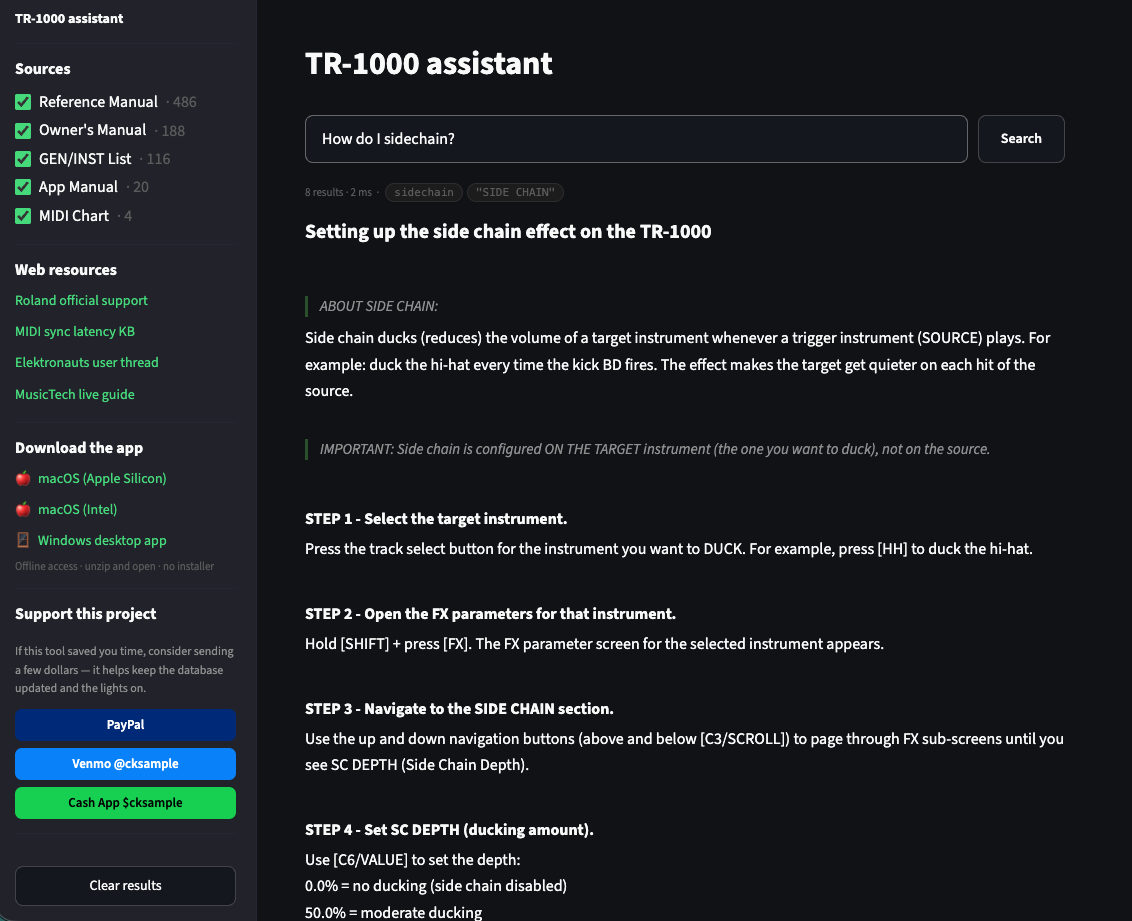
I own a Roland TR-1000. It’s an incredible machine — but the documentation situation is rough. Five separate PDFs, no cross-referencing, no search across all of them at once. Every time I wanted to look something up, I was opening multiple files and grepping manually.
So I built a tool to fix that.
TR-1000 Assistant
It’s a search app that indexes all five official Roland TR-1000 manuals and lets you query across them in one place. Type a question in plain language — “how does side chain work,” “copy kit to different project,” “what does PROB do in TR-REC” — and it surfaces the relevant passages with source citations.
No AI. No hallucination. No subscription. It searches the actual Roland documentation and shows you exactly where the answer comes from, down to the section and page.
What’s in it
- TR-1000 Reference Manual v1.20 — the deep one, full parameter reference for everything
- Owner’s Manual — panel overview, getting started, day-to-day workflow
- GEN/INST List — every preset sound with generator types
- MIDI Implementation Chart — all CC mappings, note numbers, clock behavior
- App Owner’s Manual — the editor/librarian software
- Curated Procedures — 119 step-by-step walkthroughs covering common tasks, with sources including the manuals and three official Roland videos: TR-1000 Deep Dive, v1.20 Update Overview, and Product Overview
How to get it
Use it on the web — there’s a full interactive version embedded on the TR-1000 Assistant page. Works in any browser, no install needed.
Download the desktop app — available for Mac and Windows, runs completely offline. Unzip and open, no installer required.
macOS (Apple Silicon) .zip · macOS (Intel) .zip · Windows .zip
Mac users: if macOS blocks the app, move it to Applications then run this once in Terminal: xattr -cr "/Applications/TR-1000 Assistant.app" — that clears the quarantine flag permanently.
A note on the curated procedures
The Roland manuals are thorough but they’re not always practical. They’ll tell you what every parameter does without telling you how to actually accomplish the thing you’re trying to do. The curated procedures section fills that gap — things like how to copy a pattern between projects, how the snapshot workflow actually works, how to set up a multi-track sample recording. Sources include the official Roland documentation plus three Roland videos: TR-1000 Deep Dive, v1.20 Update Overview, and Product Overview. Each procedure sourced from a video includes a timestamped link back to the relevant moment.
It’s free. Tip if you want.
The app costs nothing. If it saves you time, I’m not going to say no to a coffee:

Leave a Reply